How to Get Patent Drawings
Patent Data is Easy to Get and Useful!
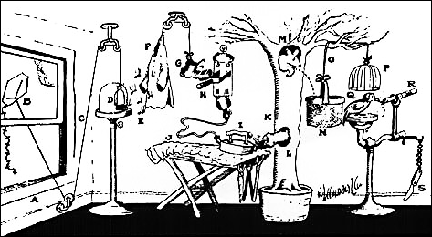
You may have noticed that a lot of our discussion about collectables is illustrated with drawings taken from the Patent on the item. As shown below, these are often quite informative and are little works of art in themselves:

Longitudinal View of a Toast-O-Lator
First and foremost, you should understand that these are easy to get and they are FREE to look at. We have noticed a disturbing trend in which some Antique Dealers are trying to sell these drawings as if they were some kind of rare commodity. One guy even wants $10-$15 for them. You must realize that free and open information is the Enemy of the Antique Dealer -- his (her) whole business is based on knowing more than you -- he can mislead you into selling things at low prices and he (she) can "snoot" you into buying things for high prices. When you know the truth, you can spot a "rip-off" a mile away. So, Lesson #1 is "DON'T PAY AN ANTIQUE DEALER FOR PATENT DRAWINGS"
The process is very easy. To begin, you have to answer three questions:
- Do you have the actual Patent Number?
- Do you think that the object was patented before 1971?
- Do you have any information or theories about when the object was made?
If you have the actual patent number, it is a cinch to get the information. Many of the collectibles from the Art Deco or Style Moderne period were made during a period of intense competition. Designers and Inventors took great pains to guard their patents. Thus, most older appliances have an actual patent number on them, generally on a nameplate or in an inconspicuous location like the bottom. So, if you have the item in hand, turn it over! If you don't have the item, you have other options:
- On many occasions, vendors on E-Bay will show highly magnified photos of these patent inscriptions to induce you to buy their wares. You may, of course, turn this to your advantage. Search E-bay from time-to-time for such data.
- In other cases, websites devoted to information (like this one) freely publish patent numbers. So, you might want to try using a search engine, entering something like "Smith-Hodgkins Widget Patent". In many cases, this is successful!
If you have the patent number in hand, click here otherwise click here.
Use This If You Have the Patent Number
Make sure that you have your Patent Number handy and then go to http://www.uspto.gov/patft/index.html. This is what the screen will look like
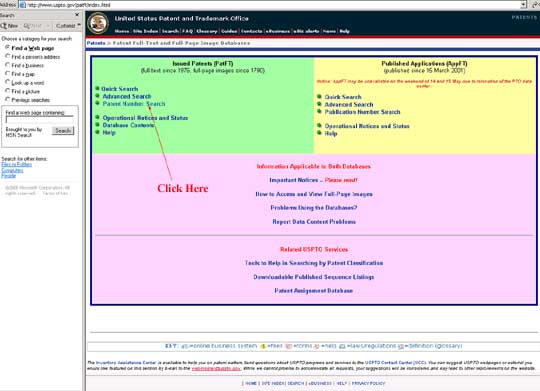
In the green (chartreuse?) area, click on the phrase "Patent Number Search". This will bring you to a second screen that will allow you to enter your patent number.
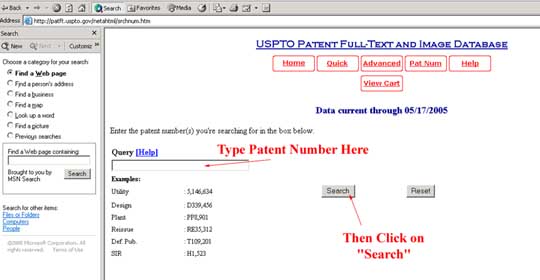
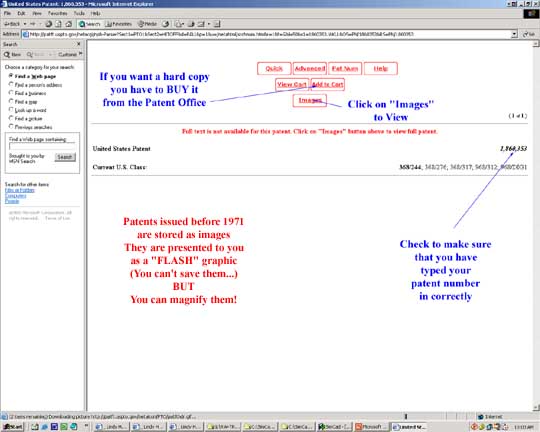
This screen looks something like the previous one, so be careful. If you made a mistake in entering your patent number, you will get a message "Request Does Not Parse" -- that simply means that the system couldn't understand what you typed. Hit the "Back" arrow and type the number in correctly. If you are successful, your patent number will be repeated on the right hand side. If the gadget was invented after 1971, you will see a display of the patent information. However, Patent documents before 1971 are stored only as "pictures" In order to see them, you have to click on the button marked "images". This will take you to a fourth screen.
Before we go there, we should note that all of these graphics are "screen shots" that were made by pressing "Shift" "Ctrl", and "Print Screen" at the same time. The "Print Screen" key is right next to "F12" on a standard keyboard. This has the effect of recording whatever is on the screen onto the clipboard. This may be pasted into a PowerPoint file. You can copy out of the PowerPoint to PhotoShop and edit the screen shot. You can crop and add notations, etc., just as we have done.
Here is the fourth screen:
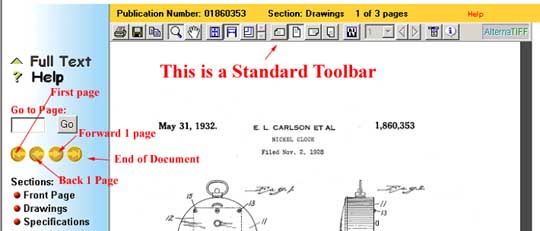
This is the actual patent document. However, it is being presented to you as a little "movie" through the magic of "FLASH" graphics. (Some machines and security configurations are not thrilled with "flash") If your brower and firewall permit, the USPTO recommends a "plugin" that will allow you to view the documents as ".TIFF" files, which will allow you to save, convert and print pages? Images are crisp, sharp and high-resolution. The only problem is that security rules (i.e. if you are accessing patents on a company computer, for your job, of course...) may prohibit you from installing the plugin.
So, if you cannot install the ".TIFF" plugin, you cannot SAVE the diagram. Alas, if you want hard copies, you must BUY them from the US Patent and Trademark Office. They are very inexpensive, however, and it is your patriotic duty to support the Government. (Our Lesson #1 should be amended to read "Don't pay anyone but Uncle Sam for Patent Drawings...") Surely, you wouldn't cheat Uncle sam by taking a screenshot of the patent diagram image!
Use This If You DO NOT Have the Patent Number
If your gadget was invented AFTER 1971, you may search the patent files. Once again, go to http://www.uspto.gov/patft/index.html. Click on "Quick Search" and follow the directions. They are the same as any other search engine. There is an "advanced search" option if you want to use a lot of fancy logic ("Hampton-Smiddley Widget" AND NOT "Crenelated Manifold"). If your gadget has been patented, the search engine will find it and you will be sent to the appropriate page. However, the drawing is being presented to you as a little "movie" through the magic of "FLASH" graphics. (Some machines and security configurations are not thrilled with "flash") So, you cannot SAVE the diagram. Alas, if you want hard copies, you must BUY them from the US Patent and Trademark Office. They are very inexpensive, however, and it is your patriotic duty to support the Government.
If your gadget was invented prior to 1971 and you don't have the patent number, you have a much more difficult -- but not insurmountable task. My first suggestion is to use Google Patent . This is a relatively new search system that has proven to be very effective. You'll probably want to use the "Advanced Search" option that allows you to winnow your search by date, to limit your focus to design patents, etc.
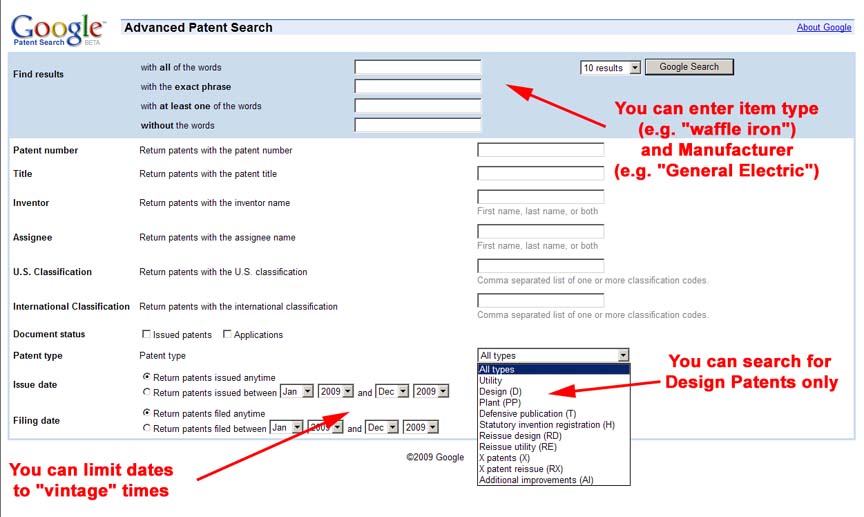
The Google Patent Advanced Search Screen
Click to Enlarge
The only problem is that Google's Optical Character Reader (OCR) has some problems interpreting the old Patent Gazette -- it was printed on cheap paper and the ink tends to "bleed", allowing confusion between "B" and "R" or "S" and (figure) "5". If you were searching for famed Industrial Designer Henry Dreyfuss, you might well try "DBEYFUSS" and "DRBYFUSS" and "DREYFU55", etc, etc. A little creativity is called for...
FreePatentsOnline has been putting the pre-1971 patents through an Optical Character recognition (OCR) program. This will enable you to search the old patents without spending a long time in the Library. As of February of 2009, the site has done a pretty good job of scanning in the "use" patents, but is quite sketchy on the "Design" patents. Almost all the patents in out Streamlined Locomotives Page were found by searching on "FreePatentsOnline". The "Advanced Search" is pretty self-explanatory. The good point is that you can limit the search to a range of years (ISD/1/1/1930->1/1/1940 will find patents between 1930 and 1939); when this time limit is combined with other information ("locomotive") it is possible to find a large number of patents. NOTE: "FreePatentsOnline" only gives the patent number. You'll have to use the procedures listed above to get the actual patent drawings and specifications.
If you can't find it with "Google Patent" or "FreePatentsOnline", you still have hope. If you have any hypothesis at all about the date at which the patent was issued, all you have to do is go to a Library, preferably and large municipal library. You want to get the Official Gazette of the US Patent and Trademark Office:
At the Library of Congress, this is LC Control Number: 70608558 It is a Serial ( i.e like a Periodical, Newspaper, etc.) publication issued monthly by the United States Patent Office, Patent abstracts section. [Washington, For sale by the Supt. of Docs., U.S. Govt. Print. Off.] Look for books about a foot high (26 cm.). If you are in Washington, the Library of Conress CALL NUMBER is T223 .A26. Request it in either the Jefferson or the Adams Building General or Area Studies Reading Rooms. The Adams Building is a real Art Deco treasure. You may have to leaf through several months worth of Gazettes, but it is great fun to look at all the crazy things that got patents. You can also enter numbers one at a time into the USPTO system to get design patents. D-110,000 is about January of 1938, and D-112,000 is about January of 1939. There were roughly 2,000 design patents issued per year, so you can work back and forth from that.
You can also read about the "Official Gazette" at the webpage of the Chicago Public Library.
Since this latter activity is kind of labor-intensive, you may find it worth your while to pay someone $10 or so. But, that is an informed decision. You can always do it yourself!
Counter for the Entire Site (not just this page..)

Home | About Lindy | Last Week's Reviews | Upcoming Events | 1940s Collecibles
The Guide - Establishments - Travel - Accessories
Music | Links | Photo Gallery | Extras | Contact